
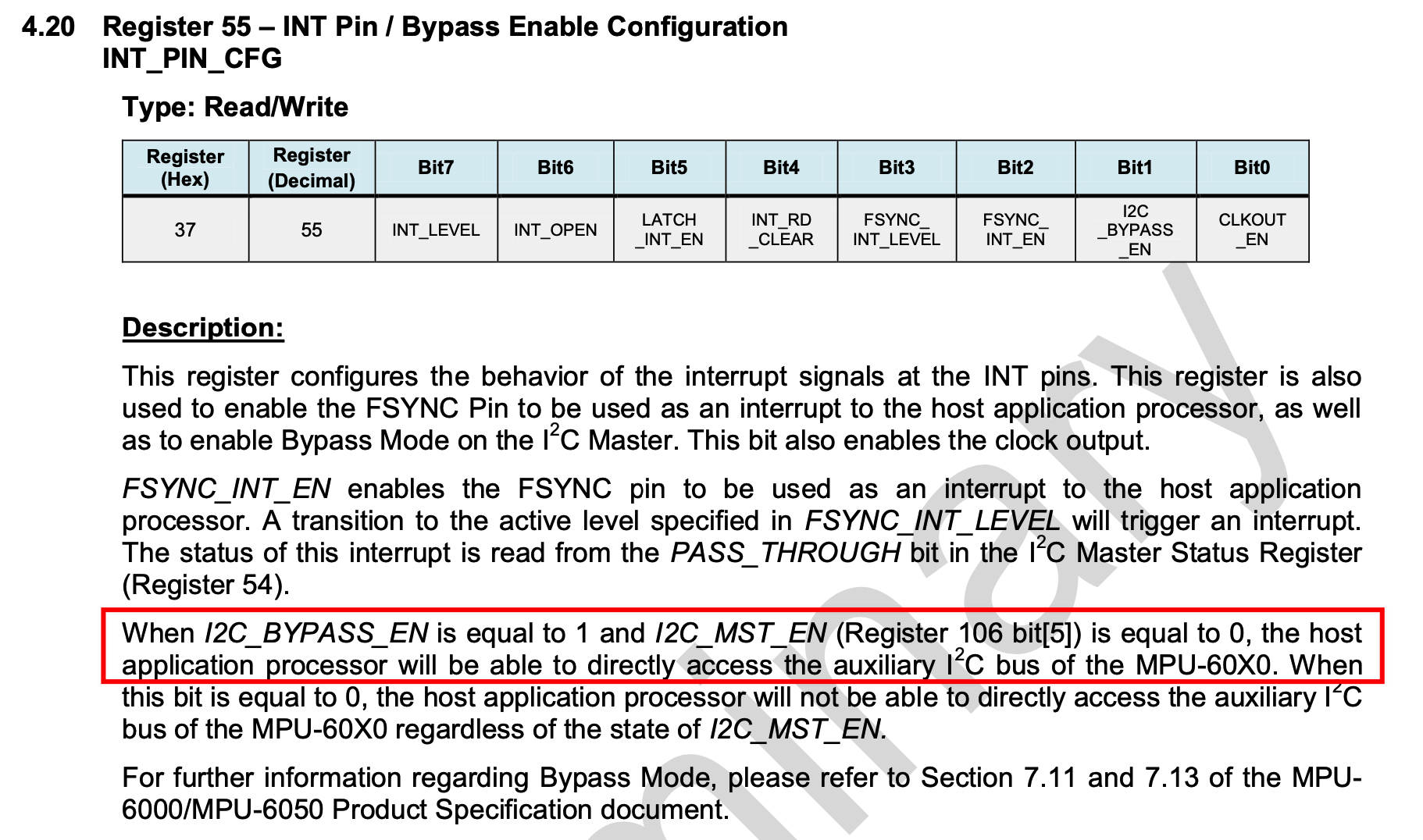
三轴磁力传感器采样的芯片,它通过I2C与MPU6050连接,默认情况下,MPU6050作为主机控制HMC5883L,stm32的I2C总线无法与HMC5883L通信。可以通过设置第55和106位寄存器放开MPU6050对从设备的控制,让从设备当作stm32的i2c总线上的设备,即可与其直接通信。
参考博客:https://blog.csdn.net/qq446252221/article/details/103959385
twentyseventeen 域的翻译加载触发过早。这通常表示插件或主题中的某些代码运行过早。翻译应在 init 操作或之后加载。 请查阅调试 WordPress来获取更多信息。 (这个消息是在 6.7.0 版本添加的。) in /var/www/html/wp/wp-includes/functions.php on line 6260三轴磁力传感器采样的芯片,它通过I2C与MPU6050连接,默认情况下,MPU6050作为主机控制HMC5883L,stm32的I2C总线无法与HMC5883L通信。可以通过设置第55和106位寄存器放开MPU6050对从设备的控制,让从设备当作stm32的i2c总线上的设备,即可与其直接通信。
参考博客:https://blog.csdn.net/qq446252221/article/details/103959385
stm32通过uart发送数据帧给上位机,上位机使用python接收数据并绘制折线图
//debug发送数据函数
#define DEBUG_PLT_START_BIT 0xfe
#define DEBUG_PLT_STOP_BIT 0xff

typedef enum dataType{
	INT8_T = 0x10,
	INT16_T = 0x11,
	INT32_T = 0x12,

	UINT8_T = 0x00,
	UINT16_T = 0x01,
	UINT32_T = 0x02,

	FLOAT = 0x20,

        CLEAR = 0x80,

}dataType_t;

//用于清空图中原有数据(程序初始化时用)
void ClearDebugPltData(int8_t dataId){
	uint8_t sendData[8]={DEBUG_PLT_START_BIT, 0, CLEAR, 0, 0, 0, 0, DEBUG_PLT_STOP_BIT};
	sendData[1] = dataId;
	sendData[2] = CLEAR;
	HAL_UART_Transmit(&DEBUG_UART, sendData, 8, 100);
	HAL_Delay(1);
}

void SendDebugPltData(int8_t dataId, dataType_t dataType, void* data, uint8_t dataLen){
	uint8_t sendData[8]={DEBUG_PLT_START_BIT, 0, 0, 0, 0, 0, 0, DEBUG_PLT_STOP_BIT};
	sendData[1] = dataId;
	sendData[2] = dataType;
	memcpy(sendData + 3, data, dataLen);
	HAL_UART_Transmit(&DEBUG_UART, sendData, 8, 100);
}
C发送数据代码示例
float data=10.05f;
SendDebugPltData(1, FLOAT, &data, sizeof(data));

uint8_t data=100;
SendDebugPltData(1, UINT8_T, &data, sizeof(data));

int32_t data=-3100;
SendDebugPltData(1, INT32_T, &data, sizeof(data));
python接收串口数据并绘图代码
#-*- coding: utf-8 -*-

# uart+绘图多线程

import threading
import serial
import matplotlib.pyplot as plt
import numpy as np
import time
import re
import struct
import sys

class MyThread(threading.Thread):
    def __init__(self,func,args=()):
        super(MyThread,self).__init__()
        self.func = func
        self.args = args
    def run(self):
        self.result = self.func(*self.args)
    def get_result(self):
        try:
            return self.result
        except Exception:
            return None


comport = "/dev/cu.usbserial-0001"#COM名称
baudrate = "115200"#波特率
maxLen=100#最大显示数据量


HEX="0123456789abcdef"
START_BIT=0xfe
END_BIT=0xff
lock = threading.Lock()
t = [0]
m = [0]
i = 0
intdata = 0
data = ''
count = 0


def initSerial():
    global serialport
    serialport = serial.Serial(comport, int(baudrate), timeout=1)
    if serialport.isOpen():
        print("open success")
    else:
        print("open failed")

def SerialReceive():
    global t,m,serialport,i
    rawData=b''
    numData=b''

    while True:
        while True:
            ch = serialport.read()
            #print(type(ch),type(rawData))
            rawData+=ch

            if(len(rawData)>8):
                rawData=rawData[len(rawData)-8:]
            #print(rawData)
            if (len(rawData)==8) and (rawData[0]==START_BIT) and (rawData[7]==END_BIT):
                break
        numData=rawData[3:7]#数值位
        dataId=rawData[1]#数据编号
        dataType=rawData[2]#数据类型


        signed=(dataType & 0x10) > 0#是否含符号位
        decimal=(dataType & 0x20) > 0#是否为小数

        if dataType==0x80:
            lock.acquire()
            i=0
            t=[]
            m=[]
            plt.cla()
            lock.release()
            rawData=b''
            continue

        print(f"dataId:{dataId} signed:{signed} decimal:{decimal} dataType:{dataType}")
        #print(f"{HEX[numData[0]//16]}{HEX[numData[0]%16]}{HEX[numData[1]//16]}{HEX[numData[1]%16]}{HEX[numData[2]//16]}{HEX[numData[2]%16]}{HEX[numData[3]//16]}{HEX[numData[3]%16]}")

        if not decimal:
            if (dataType & 0x0f == 0x00):
                data = int.from_bytes(numData[:1], byteorder='little', signed = signed)
            elif (dataType & 0x0f == 0x01):
                data = int.from_bytes(numData[:2], byteorder='little', signed = signed)
            else:
                data = int.from_bytes(numData[:4], byteorder='little', signed = signed)
        else:

            data = struct.unpack('f', numData)[0]

        i = i+1
        print(i,data)

        lock.acquire()
        t.append(i)
        m.append(data)

        lock.release()
        rawData=b''


def StartSerialReceive():
    thread = MyThread(SerialReceive,args=())
    thread.setDaemon(True)
    thread.start()

def initPlt():
    plt.grid(True) # 添加网格
    plt.ion()   # interactive mode
    plt.figure(1)
    plt.xlabel('times')
    plt.ylabel('data')
    plt.title('Diagram of UART data by Python')


def drawPlt():
    global t,m
    if not lock.locked():
        lock.acquire()
        if len(t) > maxLen:  # 清除画布,重新开始,避免数据量过大导致卡顿。
            t = t[len(t)-maxLen:]
            plt.cla()
        if len(m) > maxLen:  # 清除画布,重新开始,避免数据量过大导致卡顿。
            m = m[len(m)-maxLen:]
            plt.cla()
        lock.release()
    lock.acquire()
    plt.plot(t, m, '-r')
    plt.draw()
    lock.release()


print(sys.argv)

if (len(sys.argv) > 2):
    if (sys.argv[1]=="-len"):
        maxLen = int(sys.argv[2])
        print(f"最大数据长度修改为{maxLen}")
initSerial()
initPlt()
StartSerialReceive()


while True:
    drawPlt()
    plt.pause(0.002)
main.c中添加以下代码使能中断
HAL_TIM_Base_Start_IT(&htim3);